SQL SERVER – EXECUTE SSIS PACKAGE FROM T-SQL


/*

GET THE ENVIRONMENT_REFERENCESID WHICH IS CONFIGURED FOR PROJECT

*/

DECLARE @REFERENCE_ID INT
     SELECT @REFERENCE_ID = REFERENCE_ID
           FROM SSISDB.[INTERNAL].[ENVIRONMENT_REFERENCES] ER WITH (NOLOCK)
           JOIN SSISDB.[CATALOG].[PROJECTS] P WITH (NOLOCK) ON ER.PROJECT_ID = P.PROJECT_ID
           JOIN SSISDB.[CATALOG].[FOLDERS] F WITH (NOLOCK) ON P.FOLDER_ID = F.FOLDER_ID
           WHERE F.NAME = 'FOLDERNAME' AND P.NAME = 'PROJECTNAME'    

 /*

GENERATE EXECUTIONID BY PASSING REQUIRED INFORMATION LIKE PACKAGENAME,FOLDERNAME,PROJECTNAME AND ENVIRONMENT_REFERENCESID

*/ 
     DECLARE @EXECUTION_ID BIGINT
     EXEC [SSISDB].[CATALOG].[CREATE_EXECUTION] @PACKAGE_NAME=N'PACKAGE1.DTSX', @EXECUTION_ID=@EXECUTION_ID OUTPUT, @FOLDER_NAME=N'FOLDERNAME', @PROJECT_NAME=N'PROJECTNAME', @USE32BITRUNTIME=FALSE, @REFERENCE_ID=@REFERENCE_ID
     SELECT @EXECUTION_ID
/*
PASS THE PARAMETER VALUES DYNAMICALLY IN T-SQL . HERE I AM PASSING @VARIABLE1 VALUE TO PARAMETERNAME1 LIKE BELOW
*/
     DECLARE @VAR0 INT = @VARIABLE1
     EXEC [SSISDB].[CATALOG].[SET_EXECUTION_PARAMETER_VALUE] @EXECUTION_ID,  @OBJECT_TYPE=20, @PARAMETER_NAME=N'PARAMETERNAME1', @PARAMETER_VALUE=@VAR0
/*
EXECUTE SSIS PACKAGE FROM T-SQL STATEMENT
*/  
     EXEC [SSISDB].[CATALOG].[START_EXECUTION] @EXECUTION_ID   


SSIS – Combination of Parent Package Configuration and SQL Server Package Configuration along with Environment variable

Problem
As explained in this post SQL Server Package Configuration,we can able to make use of SQL Server configuration table values inside SSIS packages by using Environment variables and SQL server configuration . In SSIS Configuration table , it is storing one record for one package variable. If i have 20 + packages , which are  Source and destination connections. then we have to create 40 + configurations in SISConfiguration table , even though all source and destinations are same because SSIS Configuration table is saving configurations based on Package variables.

Solution
By using Parent Package variable we can able to use only two records in SQL Server Configuration table instead of each package connection string i.e. one record for Source connection and another for Destination Connection.

What is Parent Package Variable 
If a package calls another package using execute package task, then calling package is referred as Parent package and called package is referred as child package. When parent package variable is to be passed to a child package then it is called Parent Package Variable configuration

Sample Package Development :
To explain this , I have created two Packages . One is called as MasterPackage and Another one is called ChildPackage.

Master Package Setup :
In Master Package , i have taken simple execute package task and configure like below . Choose Location of package in File System and Browse child Package and Click on OK to complete .


Set Up Environment Variable in Master Package :
Screenshot 1 :  Right Click on Control flow task window and choose Package Configuration tab


Screenshot 3 : Click on Environment Variable drop down and Choose previously created SSIS_Config_DB variable

Screenshot 4 : In next wizard screen choose ConnectionString of ConfigConnection under Connection Manager section and click Next and in next screen give name as ConfigConnection and click Ok to save .

Set Up SQL Server Configuration in Master Package :
Screenshot 1 :  Right Click on Control flow task window and choose Variables and created two variables SourceCon and DestCon. In this two variables , values inside SQL Server Configuration tables will be copied by using SQL Server Configuration

Screenshot 2 : By using ConfigConnection manager ,Value of Souce Column inside SSISConfiguration Table will be Copied to package variable SourceCon and Repeated same steps for DestCon also


Child Package Set Up :
Following steps enable passing a parent package variable to child package:
1. Add a configuration to the child package
2. Select its configuration type as Parent Package Variable
3. Give the name of the parent package variable as 'SourceCon'


4. Click Next and select the Child package  SourceConnection ConnectionString as shown in below (by doing this, the Child packageSourceConnection ConnectionString's value
gets overwritten with the value of parent package variable).Continue for DestCon also.


SSIS – SQL Server Package Configuration

Problem

After we develop SSIS Packages, if we want to move developed packages to another server/ environment ,we need to change so many configuration settings in each SSIS Packages like DB Connection strings, File path and etc. But there is so much of work around this task. How we can take the advantage of the SQL Server Package Configuration which are providing by SSIS ?

Solution

SSIS offers serveral types of package configurations like environment variables,Parent Package and XML Configurations and SQL Server Configuration . In all types of configurations , parameter values are storing outside of SSIS packages and that values are utilizing while executing packages. In this post i am going to explain an approach for implementing SQL Server based package configuration that uses an environment variable to facilitate the deployment of the packages onto different servers without having to modify the packages

What is SQL Server package configuration ?

SQL Server package configuration is nothing but storing configuration values like Connection strings ,File path etc in SQL server table. To utlize this values inside SSIS Packages, we need to create one configuration connection manager inside SSIS package which tells, in which server and which database this SSIS Package Configuration table is exists. lets call this connection name as  'ConfigConnection'.

What is Environment Variable ?

Environment Variable is an variable created at machine level(Operating System level) and we can give the value to the Environment Variable and can use this value inside any of the program which are runing in the machine . In our example we will use SSIS_CONFIG_DB Environment Variable inside our SSIS package. So i have created one SSIS_CONFIG_DB Environment Variable at machine level and given below value

Data Source=localhost;Initial Catalog=SSISConfig;Provider=SQLNCLI.1;Integrated Security=SSPI;Auto Translate=False;


We will see later in post how to create Environment Variable and edit value in this Variable

What is need of environment Variable to make use of SQL Server package configuration ?

As i explained above, to get the configuration values of SQL Server table , we have to create one connection (ConfigConnection ). Since during the development we are pointing to a development DB instance, we need to change the connection information point to the QA or Production source databases without editing the package each time.

To notify what is connection string of ConfigConnection to SSIS package , we have to use environment variable which is already having the connection string value This allows for the package to point to configuration table based on Environment (dev, QA, test, prod, etc).Each configuration table shall have the configuration values that are appropriate to each environment.The environment variable shall exists in all machine where you intend to deploy the package, and its content should be updated to accordingly.

Advantages of SQL Server package configuration over the other package configurations :

  • DBAs are usually more comfortable working with SQL Server tables than XML files.
  • Storing package configuration values in a SQL Server database rather than on the file system 
  • Simple T-SQL commands such as INSERT, UPDATE and DELETE. 
Set Up Environment Variable :


Choose Advance System Settings

 Choose Environment Variables


Sample Package Development : 
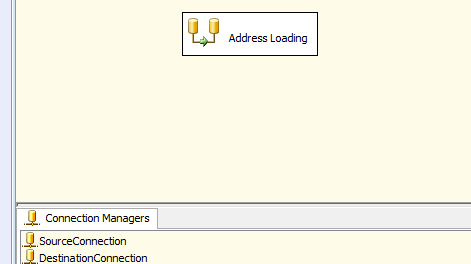
Let’s assume we have a package that has a connection manager called ‘SourceConnection’, which has the connection information of the source DataBase where the package is trying to retreive data from. Also we have one more connection manager called ‘DestinationConnection’ where the data is going to be load.

Screenshot 1: Sample Package which has one Data flow task , two OLEDB connections i.e. one Source Connection and one destination connection


Screenshot 3 :  Right Click on Control flow task window and choose Package Configuration tab


Screenshot 5 : Click on Environment Variable drop down and Choose previously created SSIS_Config_DB variable

Screenshot 6 : In next wizard screen choose ConnectionString of ConfigConnection under Connection Manager section and click Next and in next screen give name as ConfigConnection and click Ok to save .

Screenshot 7 : Again go to Package Configuration wizard and click on Add to add new configuration for Source 


Screenshot 8 : Choose SQL Server type in Configuration Type And in Specify Configuration tab, Choose ConfigConnection String and Choose Configuration Table (for first time we need to create new table ,by clicking New else we can choose from drop down)
 
Screenshot 9: Choose Configuration Filter from drop down list (for new record entry in table just type 'Source' then it will insert one entry in Configuration table else choose from drop down list) to utilize value from SQL Server table dynamically , when package is executing 

Screenshot 10 : Next screen , choose SourceConnection ConnectionString to copy dynamically from the SQL Server table value to SourceConnection ConnectionString


Screenshot 11: Repeat same steps for Destination Connection Also


Once we have developed our packages like above, if we want to deploy to another server like QA or Production , We just need to Create One Environment Varible at Server level and need to change connection strings  values in Configuration table 

Note : Once we create Environment Varible at new Environment , we need to restart that machine to identify in SSIS Packages

SSIS – CONFIGURE ENVIRONMENTS AND ENVIRONMENT VARIABLES

As we see above, we can create folder in SSISDB. Each folder we create, it will automatically create two subfolders called Projects andEnvironments 
Projects: A place holder for deployed projects inside Folder
Environments: A placed holder for environments like DEV and QA
To create an environment, right click on the Environments subfolder and click on Create Environment menu item as shown below:


SSIS – DEPLOY DEVELOPED SSIS PROJECT TO INTEGRATION SERVICES CATALOG

After development of our SSIS package to SSISDB, to deploy SSIS Project,just right click on project file and choose Deploy


SSIS – DEVELOP SIMPLE SSIS PROJECT

SSIS Project creation remains same from SSIS 2008 to SSIS 2012. To create SSIS project file, we need to open BIDS and choose Integration services .If you are new to SSIS , please go through basis of SSIS project creation and package development
In my example,  I have two similar tables (CountryDetails) in two different databases (SampleDataBase1, SampleDataBase2).  I created one simple package, logic is to insert one row to CountryDetails table in either of SampleDataBase1, SampleDataBase2 databases based on environment configuration

Table Structure:

CREATE TABLE [dbo].[CountryDetails](
       [ID] [float] NULL,
       [StateProvinceCode] [nvarchar](255) NULL,
       [CountryRegionCode] [nvarchar](255) NULL,
       [IsOnlyStateProvinceFlag] [float] NULL,
       [Name] [nvarchar](255) NULL,
       [TerritoryID] [float] NULL

) ON [PRIMARY]

SSIS – DEPLOYED SSIS PROJECTS VERSIONS AND RESTORE TO PREVIOUS VERSION

Good thing in Project Deployment Model is we can store multiple versions of SSIS projects inside SSISDB. And also if we want to rollback to previous versions of deployed packages, we can simply restore to desired version. To see the previous versions of deployed projects, just right click on project and choose Versions 


SSIS – REDEPLOYING THE PROJECT TO INTEGRATION SERVICES CATALOG

Nothing is constant ,we usually gets so many change requests in our process with respect to Functionality, Performance and  fix fixes .So we need to change our Packages according to new requirements.  Once we changed our SSIS packages in Project and if we want to redeploy SSIS packages to same location in Integration Services Catalog, just right click on Project and choose Deploy option. Redeploying Packages is not different from deploying SSIS packages first Time. 


SSIS – VALIDATE THE DEPLOYED PROJECT OR PACKAGE

Once we deploy the SSIS Packages to Integration Services Catalog, we need to validate before we execute our packages to ensure that they will execute properly. In validation, it will show list of errors if we have any issues with our packages


SSIS – HOW TO OPEN .ISPAC IN BIDS (VISUAL STUDIO)

Sometimes we need to edit the deployed SSIS packages, so to edit we need to open deployed .ispac in BIDS. We can open .ispac in two ways by using integration services import project wizard

SSIS – EXECUTE DEPLOYED PROJECT/PACKAGE WITH THE ENVIRONMENT

Once we develop and deployed SSIS project to Integration Services Catalog, configured environment/environments variables and given reference for environments. We need to unit test by executing deployed packages, whether our environments variables inside environments are consuming or not. 

SSIS – CONFIGURE ENVIRONMENT REFERENCE IN THE DEPLOYED PROJECT

We have configured Integration Services Catalog and deployed project and created two environments. Now we need to make relation between environments and deployed projects. To do that, right click on deployed project and choose configure 


SSIS – PROJECT DEPLOYMENT MODEL

As a MSBI developer, I always enjoys while deploying of SSRS reports and SSAS cubes but not in case of SSIS packages deployment because we have project level single click deployment in SSRS and SSAS, here our life is so easy but I always feel difficult with  SSIS packages legacy deployment and management of SSIS packages. There we need to deploy SSIS packages individually either in file system or system database MSDB
Good News for SSIS Developers is, in SQL server 2012 Microsoft introduced SSIS Package Deployment Model i.e. single click project deployment. Also it introduced new specific database for only SSIS Package Deployment called SSISDB. Now in this topic I cover what it is SSIS Package Deployment Model and how to deploy your SSIS packages to SSISDB

SQL SERVER – EXECUTE SSIS PACKAGES FROM SQL SERVER MANAGEMENT STUDIO

By using xp_cmdshell we can run the Packages from the SQL server. Before to run the packages from the SQL Server we need to enable xp_cmdshell  by running below script

EXEC sp_configure 'show advanced options', 1
GO
-- To update the currently configured value for advanced options.
RECONFIGURE
GO
-- To enable the feature.
EXEC sp_configure 'xp_cmdshell', 1
GO
-- To update the currently configured value for this feature.
RECONFIGURE

GO

SSIS – HOW TO CALL A WEB SERVICE BY USING THE WEB SERVICE TASK IN SSIS

In this post I am are going to discuss about how to configure Web Service task to call Currency Converter Web Service in SSIS and how to read the information from the web service Currency Converter. In this example we used the public web service from the below URL

www.CodeNirvana.in

Powered by Blogger.

Translate

Total Pageviews

Copyright © Journey to MSBI World With Kiran Reddy | Blogger Templates | Designed By Code Nirvana